Sign In offers 10+ different smooth ways to simplify access
Netgraph Connectivity Platform has 10+ login methods for BYOD (Bring Your Own Device), IoT (Internet of Things), staff, and guests, which can be combined and activated in parallel. On the same network.
Multiple modules in Netgraph Connectivity Platform offers multiple simultaneous login options. Different options are available for individual persons, visitors, groups, or public places.
Focus on the user experience
Having modern meeting rooms is important, but it is the overall feeling that leaves a lasting impression. Netgraph Connect allows you to focus on the person, not on the administration.
Start of a good relationship
Offering a good network is not only great customer care, but it is also a fantastic opportunity to start a long-lasting relationship with your visitors.
Efficiency in focus
Visitors and meeting hosts manage the application and login themselves. The result is efficient meetings and relief for administrative staff.
The Captive Portal - Where the Journey Begins
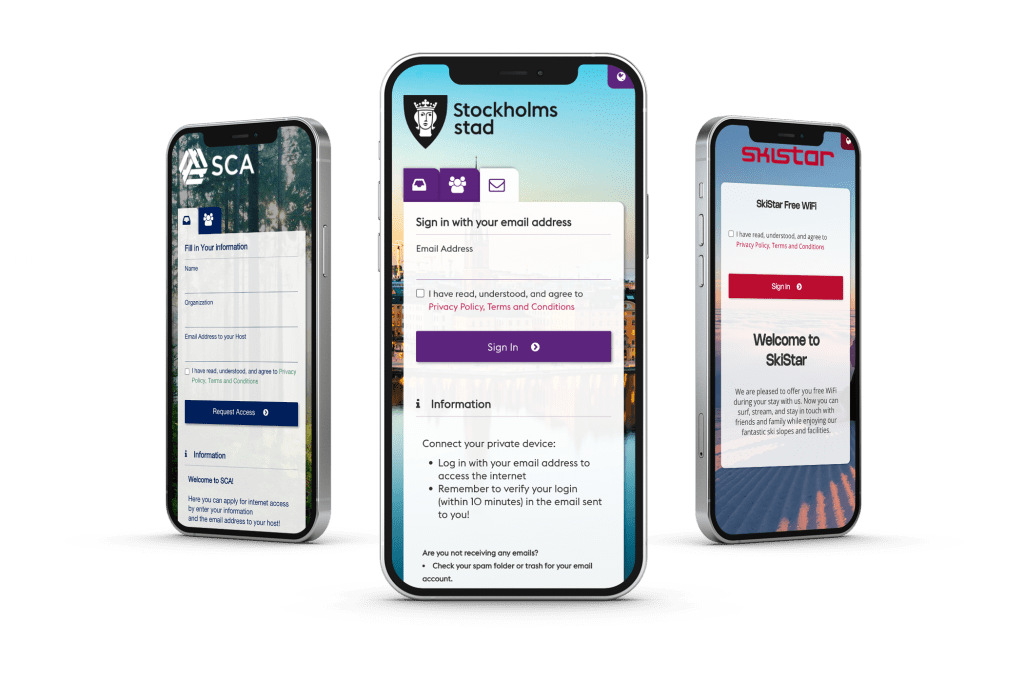
Our built-in, fully responsive Captive Portal takes network access to the next level by letting you customize every aspect to match your brand identity. From logos and color schemes to user-friendly login flows, you can easily tailor the portal to meet specific needs for different environments, such as schools, event arenas, or corporate offices.
Whether you’re managing Guest Access, BYOD, or large events, our Sign In service gives you the flexibility to customize login methods and the user experience, all while keeping your network secure and aligned with your brand.
Meeting Host
Choose from options such as Meeting Host verification, SMS, Email (with bounce check and self-verification), and Password Subscription via public URLs—ideal for locations like waiting rooms and service areas.
Conference
Easily manage large groups of visitors with our Conference & Group ID feature, offering temporary event-based access for streamlined onboarding.
Self-Provisiong with Email
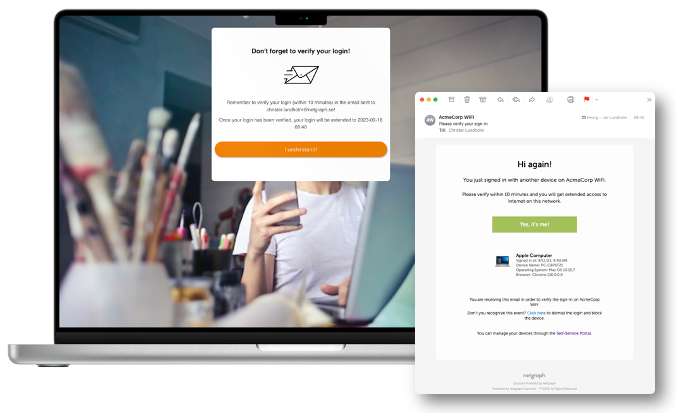
Email sign-in with verification is the perfect solution for Guest and BYOD access, offering seamless, secure, and temporary network entry. Easily managed, it ensures controlled access with customizable time limits, enhancing both security and user experience.
BYOD with Singel Sign-On
Facilitate seamless network access for employees bringing their own devices, ensuring secure connections across your organization’s locations.
Username & Pass
Lorem ipsum dolor sit amet, consectetur adipiscing elit. Ut elit tellus, luctus nec ullamcorper mattis, pulvinar dapibus leo
Click-to-Connect
Boost engagement with our "Click-to-Connect" and auto-redirect to your venue's page after login. Simple, seamless, and effective!
Whitelisting
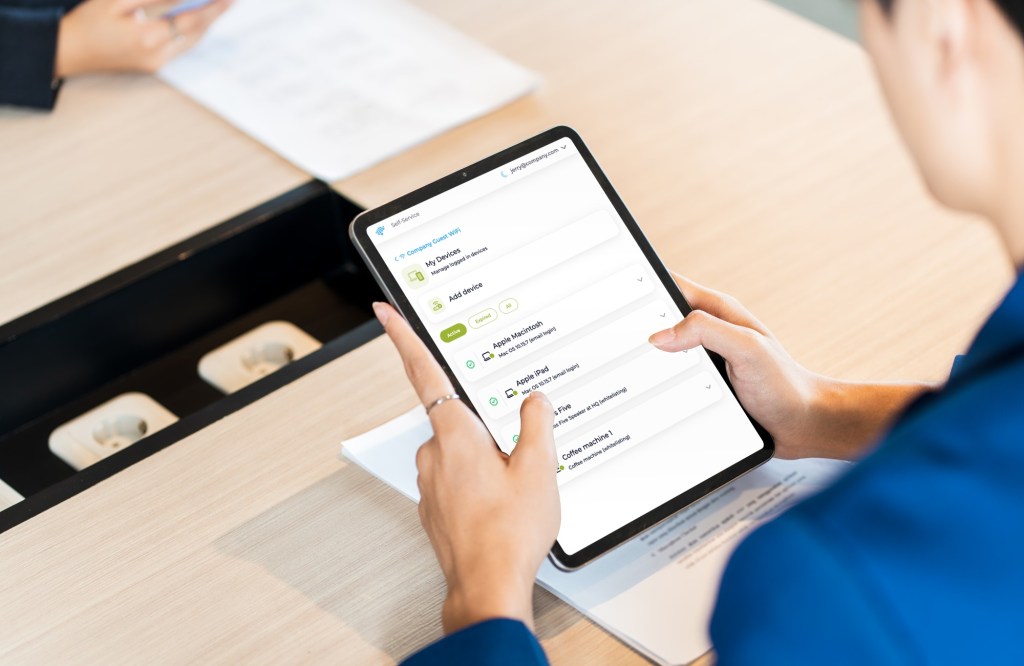
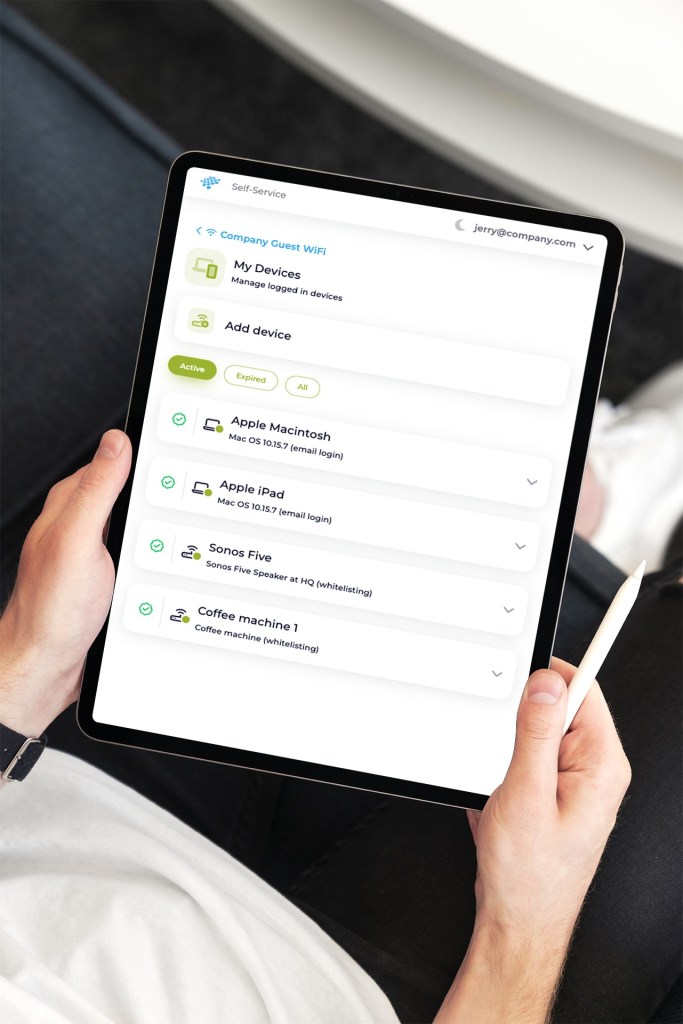
Make sure all devices are connected, even those without a screen or keyboard. Easily managed via the Self-Service Portal.
Password Subscription
The password module provides secure network access with time-based passwords (valid for one day, one week, or one month), created through the admin portal.
Site-based Redirects
Enhance the user experience with tailored redirects based on the location of access (e.g., branch offices, HQ, store location), guiding users to the appropriate network or resource.
Sign In is designed to provide a flexible and user-friendly experience for both guest networks and BYOD (Bring Your Own Device) scenarios. With 10+ different sign-in methods, you can tailor the login process to meet your specific needs, whether for guests, employees, or large groups.
Effortless Connectivity - Click, Connect, and Engage
Unlock seamless internet access with our fully customizable Captive Portal solution, designed to enhance user experience and drive customer engagement.
With our simple Click-to-Connect feature, users are just one click away from getting online. All they need to do is confirm the terms of use, and they are instantly onboarded and redirected to your chosen webpage—usually your homepage—helping you generate traffic and boost your return of investment.
Brand Awareness
Customize the portal with your branding, making every connection point a reflection of your business.
Increased Traffic
Direct users to your homepage or any target webpage, driving valuable traffic to your site.
Engagement Opportunities
Add surveys or promotional content for deeper customer interaction.
Turn your network into an engagement tool with our Click-to-Connect, where every connection is a chance to grow your brand and increase your returns.
Meet.. the Meeting Host
With the Meeting Host sign-in module, managing visitors is as simple as offering a cup of coffee! Make it easy for your team to handle visitor connections seamlessly, enhancing efficiency and making every meeting run smoothly.
Step 1
The Guest connects to Wi-Fi
Your visitors can effortlessly connect to the network, entering their details on the Captive Portal and whom they’re here to see directly on their device.
Step 2
The Host gets notified via email..
Sign In automatically alerts the host when a visitor requests access, saving valuable time and reducing hassle.
Step 3
..and easily handles the request
The host can quickly handle their own visitors, making reception duties a breeze and ensuring meetings start on time.
With Conference, Managing Large Groups is a Breeze
Sometimes there’s a need to quickly get a larger group online, whether it’s for a course, an event, a school class, or a conference. Through the Self-Service Portal, employees can easily create IDs, or even do it via a conversation with our Cisco Webex bot.
Streamline Network Access with Secure Email-Based Self-Provisioning
Whether in Hospitality, Enterprise, or Education, users can easily log in with their email, verify access, and manage multiple devices without IT support. Gain valuable user data, control device quotas, and customize access policies—all while improving user experience and operational efficiency.
Captive Portal Login
Users can quickly log in by entering their email address, gaining immediate access to the network. For hospitality environments, this is a great way to collect email addresses for marketing purposes.
Optional domain filters can be applied, limiting access to users with specific company or organization email domains, ensuring only authorized personnel can connect.
Email Verification for Extended Access
Upon initial login, users are granted a short-term access window. To prolong their session, they will receive a verification email where they must confirm their email address. The extended access period is determined by the administrator’s settings, making it flexible for different use cases.Device Quota Management
Administrators can set a limit on the number of devices a user can have connected simultaneously. When the quota is reached, users are notified via email and prompted to revoke access from a device to allow a new one to connect. This ensures fair and balanced access across users.Customizable Access Policies
Multiple domain filter policies can be active simultaneously, each with its own access time frames and device quotas. For example, a school could grant students network access for the duration of the semester, while enterprise users might have different time or device restrictions.Marketing Integration
Hospitality businesses can take advantage of email collection for marketing by enabling features like a newsletter opt-in checkbox during the login process. All collected email addresses can be easily exported via the admin portal for targeted marketing campaigns.Event API for Real-Time Data
For integration with other business systems, our platform includes an Event API that can send real-time updates via webhooks whenever a user logs in or is active on the network. This enables automated responses in connected systems, enhancing operational efficiency and user engagement.
Admin Dashboard & Analytics
Administrators have full visibility over user activity and can export connected email addresses for specific time periods. The dashboard also allows fine-tuning of policies like access duration, device quotas, and domain filtering.
Self-provisioning via email not only ensures secure and controlled network access but also provides valuable tools for data collection, marketing, and integration with external business systems. Whether you’re running a hotel, an enterprise, or an educational institution, our solution is tailored to meet your specific needs for network connectivity and user management.
Seamless BYOD Access with Single Sign-On
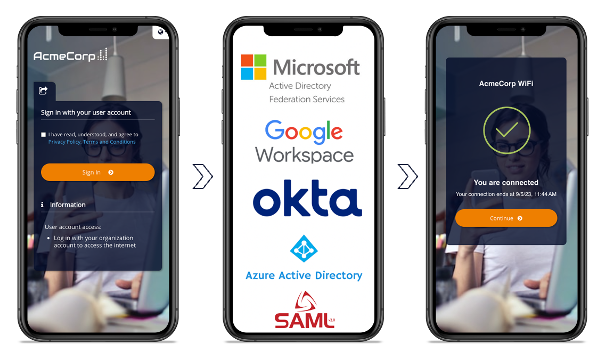
Provide a seamless and secure user experience through a captive portal where users can sign in with their personal accounts via SAML integration. This solution is ideal for BYOD environments, allowing administrators to easily grant network access using the same credentials users already use to log into other systems within the organization, such as Active Directory (AD).
Single Sign-On (SSO) Convenience
SAML integration allows users to sign in once with their existing organizational credentials and gain access to the network, the self-service portal, and other systems without needing to repeatedly enter passwords. This streamlines the login experience and reduces the burden of password management, improving both security and usability.
Enhanced Security with Centralized Authentication
By leveraging SAML for authentication, the platform ensures that user credentials are centrally managed through the organization’s Identity Provider (IdP). This reduces the risk of unauthorized access and minimizes the attack surface for credential theft, since users only need to manage one set of secure credentials.
Streamlined User Management for BYOD
The ability to use existing AD accounts for network access simplifies the onboarding process for both employees and students. New users can immediately access the network without requiring additional account setup, making it faster and easier to get started.
Scalability Across Multiple Devices and Locations
Whether in a corporate office, a university campus, or a distributed work environment, the platform’s SAML integration ensures that user authentication remains consistent across locations. This is especially valuable in large-scale organizations, where employees and students frequently move between different buildings or geographic sites.
Granular Access Control
Administrators can specify access times directly in the admin portal, allowing for time-based network access. Once the designated access period ends, users are automatically logged out and must authenticate again to regain access. This is particularly useful for temporary or guest users like consultants or contractors.
Self-Service Portal for User Flexibility
With SAML-based SSO, users can access a self-service portal to manage their own device connectivity. They can easily choose which devices are active within their quota, offering flexibility and self-management without needing constant administrative intervention.
By integrating SAML with the captive portal, administrators gain a powerful tool for easily managing network access while enhancing security and providing a better experience for users. Whether for students, employees, or consultants, our platform simplifies network connectivity, reduces administrative overhead, and ensures a secure, scalable solution for modern BYOD environments.
Use Whitelisting to Simplify Device Management
The platform ensures seamless and secure network access through various management options, catering to administrators and employees alike.
Easy Centralized Management
- Admins can easily whitelist devices via the Administration Portal.
- Each device can be given a unique name, description, and end date for network access.
- Filter out devices that not been seen online for a given time period and revoke access.
- Ideal for full control and oversight by network administrators.
Self-Service Portal for Employee Empowerment
- Employees can utilize the Self-Service Portal to add devices themselves.
- Distributed administration ensures decentralization, improving efficiency while maintaining security.
- Perfect for organizations that support employee-driven device management.
Bulk Import for Efficiency
- Our platform supports the bulk import of whitelisted devices.
- Save time and minimize manual input for larger deployments.
API Integration for MDM Solutions
- The platform includes an API designed for integration with Mobile Device Management (MDM) solutions.
- Enables the automatic addition and removal of devices, streamlining device management processes.
The platform is designed for flexible, scalable, and secure management of network connectivity for devices without user interfaces, making it an ideal solution for organizations looking to simplify device management while maintaining tight control over network access.
Secure Access with Time-Limited Password Subscriptions
The Password Management module streamlines secure sign-ins across networks via the built-in captive portal. Administrators and employees can easily generate time-limited passwords (valid for one day, one week, or one month) through our admin or self-service portals. Multiple passwords can be issued simultaneously, offering flexibility while providing insights into which users are connected via each password.
Time-Based Passwords
Passwords can be set to expire after specific durations, ensuring security by requiring users to re-authenticate after the validity period ends.
Password Subscriptions
Users can subscribe to email updates for new passwords, ensuring continuous access without interruption.
Public URL Display
Passwords can be shared via a public URL, making it easy to display them on intranet pages or digital signage screens in waiting rooms or service points.
Static Password Support
Static passwords can also be created for long-term use, remaining active until deactivated within the platform.
When the time-limited password expires, all connected devices automatically lose access, requiring re-authentication with the new active password. With full visibility into who connects to the network and through which password, administrators maintain complete control over network access.
Compliant Network Access with Built-in Data Privacy Controls
Netgraph Connectivity Platform™ is built with compliance in mind.
We provide you with full control over key settings in the admin portal, including:
- Setting and adjusting access policies
- Defining custom retention periods for personal data
- Searching and managing user information
- Exporting user activity reports for compliance audits
Advanced Search and Reporting
The admin portal allows for easy searching of specific users via MAC address, email, or phone number. Administrators can generate detailed reports on user engagement, providing insights into user engagements. In line with data privacy laws, users have the option to opt-out, and admins can remove or anonymize their information upon request.
Data Retention and Privacy
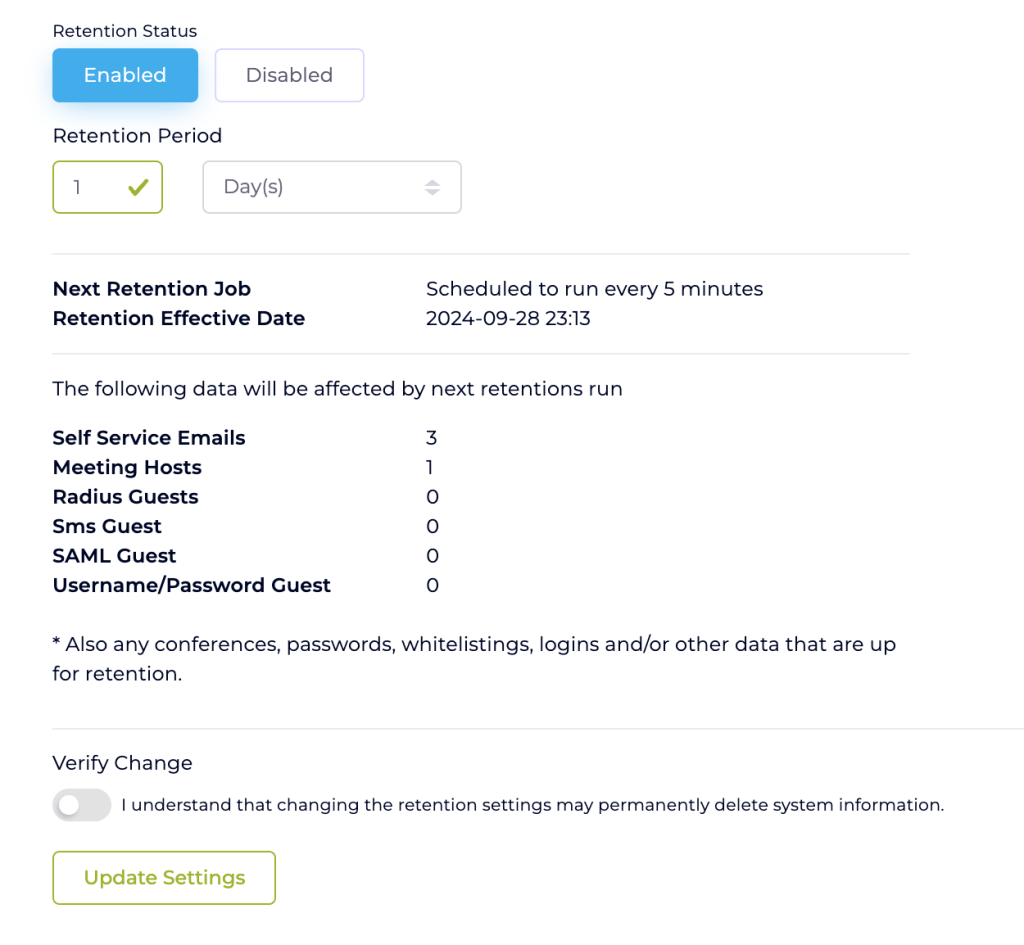
To support privacy regulations, the platform includes a robust data retention function. Personal data collected during the connection process is automatically deleted after a specified period, which can be customized by the customer via the admin portal. Administrators can set retention periods in days, months, or years, ensuring compliance with various data protection laws. During the retention process, the system filters and permanently deletes personal information once the access period has ended.
Compliance & User Acknowledgements
Users must acknowledge the organization’s terms and conditions before gaining access, ensuring legal coverage and user consent. Additionally, they are informed of the privacy policy, which outlines what personal information is collected, how it will be processed, and the retention period.
With Netgraph Connectivity Platform, organizations can ensure secure, policy-driven access to their networks while staying compliant with data privacy regulations.
Administration
The administrator has full control and traceability. The key word is self-service.
Our cloud-based Administration Portal provides everything you need to manage your guest WiFi effortlessly, from customization to compliance.
Designed for businesses of all sizes, our platform simplifies network management while ensuring security and offering flexibility for a variety of user needs.
Personalize Your Captive Portal:
Tailor your guest WiFi login page with your brand’s colors, logos, and messaging for a consistent user experience.
Choose From 10 Sign-In Methods:
Whether you prefer meeting host login, SMS, email, or any of our 10 sign-in methods, you have the flexibility to meet your business requirements.
Bring Your Own Device Solutions:
Support employees and guests bringing their own devices by offering seamless and secure network access that integrates with your corporate policies.
Ensure Regulatory Compliance:
Stay compliant with data privacy regulations like GDPR by managing data retention, terms and conditions, and other key compliance features directly from the portal.
Track Real-Time Usage & Analytics:
Access valuable insights with usage statistics and traffic graphs, helping you monitor guest activity and optimize performance.
Manage DHCP and DNS Services:
Our platform integrates DHCP and DNS management, giving you control over IP addressing and domain resolution.
The user-friendly Administration Portal simplifies BYOD and guest management, delivering a customizable, secure, and compliant network access experience. Whether you're managing daily visitors or large events, we offer the tools to enhance your guest WiFi experience.
Self-Service Made Simple – Connect, Manage, Smile!
With the Self-Service Portal, managing guest access, personal devices, and IoT gadgets has never been easier—or more fun.
Empower your team, impress your visitors, and stay in control with just a few clicks.
It’s self-service made simple!
The Self-Service Portal is a go-to solution for managing network access with flexibility and security. Accessible via the web for employees and authorized users, the portal offers an intuitive experience that simplifies network administration.
The Self-Service Portal empowers your organization by enabling distributed administration across teams and departments. Employees can manage guest access, IoT devices, and personal devices locally, reducing the burden on central IT. This flexibility ensures faster, more efficient processes while maintaining the highest level of security and control. Whether for a small team or a large organization, distributed administration makes it easy to adapt to your unique needs.
It’s the perfect choice for organizations seeking to streamline and enhance their network administration.
Connectivity Challenges Solved – Simply and Securely
By combining our services – Sign In, EntryPoint - RADIUSaaS, Cisco Meraki WPN Manager for Wi-Fi Personal Network, and integration with Cisco ISE for device management and encrypted IoT Wi-Fi networks – we solve everything from simple login needs to advanced network challenges.
EntryPoint
RADIUS-as-a-Service with 802.1X, IoT iPSK, and MAB for secure enterprise authentication and device management.
Wi-Fi Personal Network
Integrate with your Cisco Meraki network and provide Co-Living & Co-Working with ease and Self-Service.
ISE Device Management
API integration with Cisco ISE that simplifies and secures device management and network access through distributed administration.
For every IT department who wants to make real difference
Let’s create a solution that works for your business — secure, flexible, and designed to grow with you.