
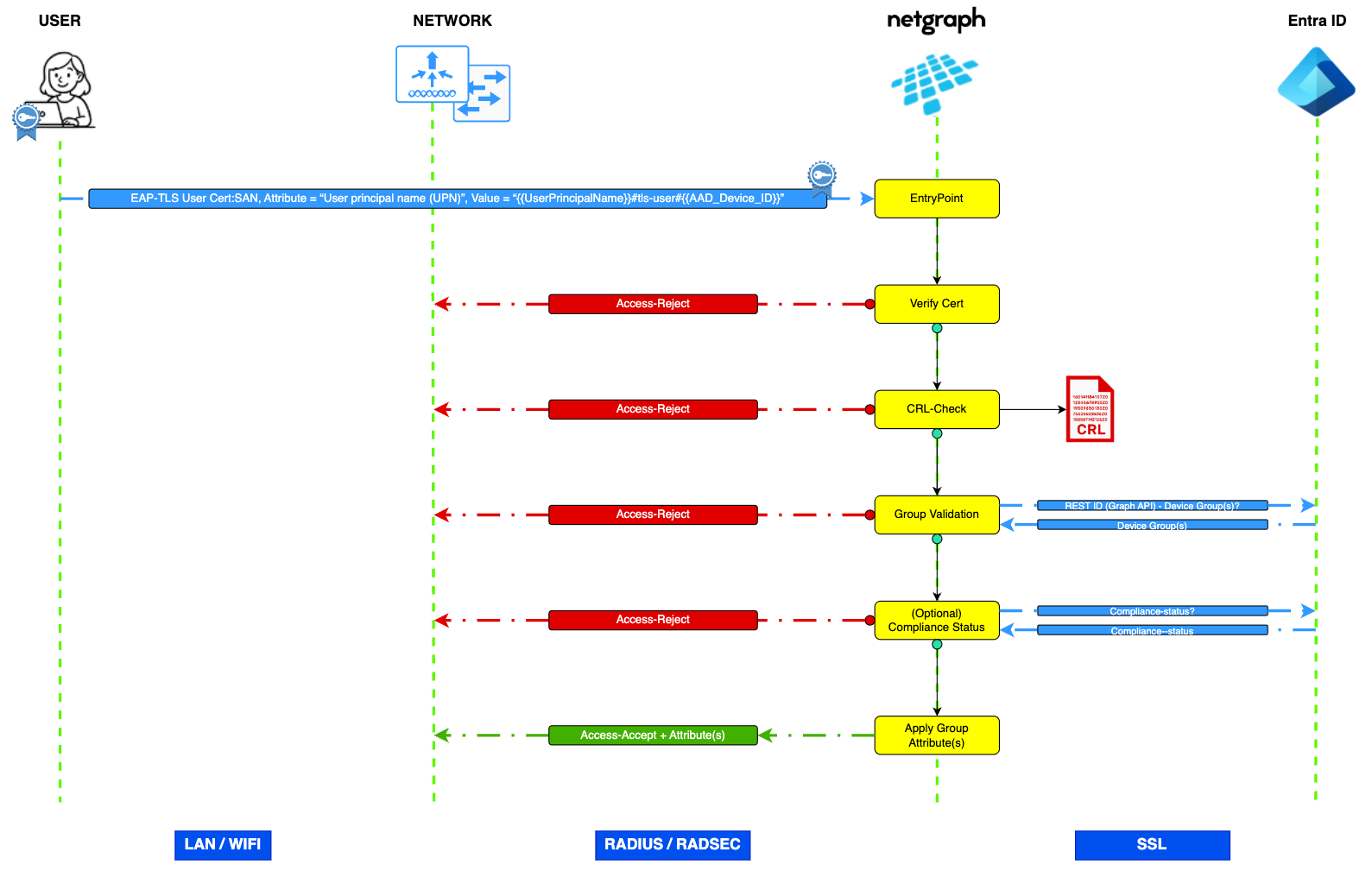
The EntryPoint RADIUS Service for Dot1x (EAP-TLS) with MS Entra ID ensures that only authorized devices can access your network by using certificates for secure login. Microsoft Entra ID helps manage these logins by verifying users’ identities (User Principal Name, UPN) and compliance (GUID, Globally Unique Identifier aka Entra Device ID) in a secure and efficient way.
Requirements and dependencies #
To complete the configuration in this guide you need access and the required license to the following:
- Microsoft Entra
- Microsoft Intune
- Microsoft Cloud PKI (In some Intune licenses included)
- Netgraph Entrypoint
- WiFi Infrastructure (Example with Cisco Meraki in this guide)
Get started #
Prepare the dependencies in Entra + Intune Admin Center and Netgraph Admin Portal #
- Create Microsoft Graph API credentials and permissions
- Create Microsoft Cloud PKI (Root + Issuing CA)
- Example: Create a SCEP certificate profile — device (Microsoft Windows)
- Example: Create a Trusted certificate profile — RADIUS Server Certificate (Microsoft Windows)
- Example: Create a Trusted certificate profile — Root CA Certificate (Microsoft Windows)
- Example: Create a Wi-Fi profile — Acme Enterprise WiFi (Microsoft Windows)
- Create a Netgraph Entrypoint RADIUSaaS Context — Basic Configuration
- Setup Netgraph Entrypoint RADIUSaaS Context — 802.1x Authentication (EAP-TLS)
- Setup Netgraph Entrypoint RADIUSaaS Context — Network Integration
- Setup Netgraph Entrypoint RADIUSaaS Context — Entra Group Mapping
- Cisco Meraki Example (coming soon….)
#
Note: Modifications to the Microsoft environment should be undertaken only by personnel with appropriate technical expertise to ensure a correct configuration and to mitigate the risk of unintended operational impacts. #
Convert Certificate DER — > PEM, PEM –> DER #
If your cert is in DER format you can convert it with OpenSSL to PEM:
Linux/Mac: openssl x509 -inform der -in <name>.cer -out <name>.pem
Windows: certutil.exe -encode <name>.cer <name>.pem
And in that case, if you need to convert PEM to DER format, example below:
Linux/Mac: openssl x509 -outform der –in <name>.pem -out <name>.crt
Windows: certutil.exe -decode <name>.pem <name>.crt