
Overview #
Security Assertion Markup Language (SAML 2.0) is a widely used authentication standard that enables secure and seamless Single Sign-On (SSO) across different applications and services. By integrating SAML-based authentication, organizations can allow users to authenticate using their existing identity provider (IdP), reducing the need for separate login credentials.
SAML 2.0 Integration in the Platform #
The platform supports SAML 2.0 authentication for multiple services, allowing organizations to centralize identity management and enforce access policies. SAML authentication can be configured for:
🔹 Admin Portal – Secure administrator login with corporate identity management (e.g., Azure AD, Google Workspace, Okta).
🔹 Self-Service Portal – Enabling BYOD users, employees, and guests to log in with their organizational credentials.
🔹 Captive Portal Authentication – Allowing network access through SAML-based login, providing a frictionless user experience while maintaining security.
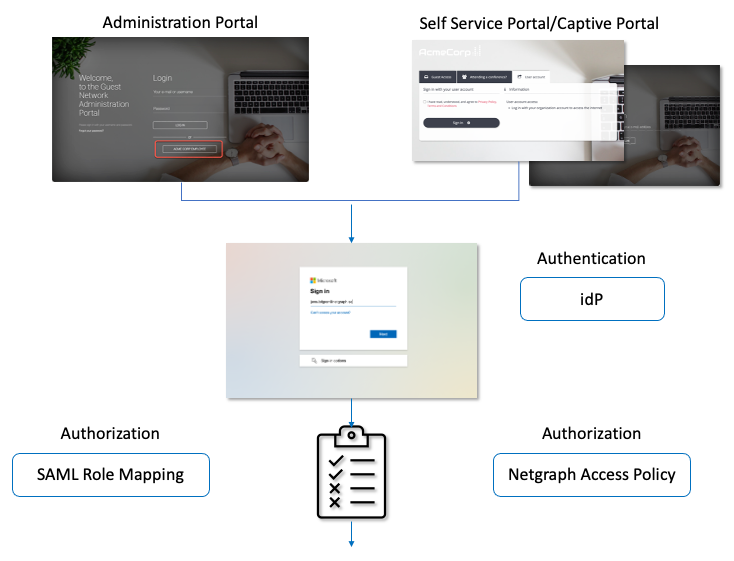
- In order to configure SAML 2.0 authentication for the Admin Portal, follow the guide Authentication for Admin Console.
- In order to configure SAML 2.0 for the Self Service Portals (Captive-/Self Service Portal) follow the guide Authentication for Captive-/Self Service Portal.
And of course, if you wish to configure SAML 2.0 authentication for both Administration and Self Service Portals, then you need to perform both steps.
Key Benefits of Using SAML Authentication #
✅ Centralized Identity Management – Users authenticate through a single IdP, simplifying credential management.
✅ Enhanced Security – Eliminates password reuse risks by leveraging corporate authentication policies (e.g., MFA, conditional access).
✅ Improved User Experience – Enables Single Sign-On (SSO) across multiple platforms and services.
✅ Customizable Access Control – Organizations can enforce granular access policies based on user roles, group memberships, or domains.
✅ Reduced IT Overhead – No need for separate user databases, as authentication is handled by the existing IdP.
By integrating SAML 2.0 authentication, organizations can improve security, compliance, and user experience while maintaining full control over access policies and identity verification. The following sections provide step-by-step guidance on configuring SAML authentication for Admin Portal, Self-Service, and Captive Portal access. 🚀